Stunning Contrast from
Production to Post
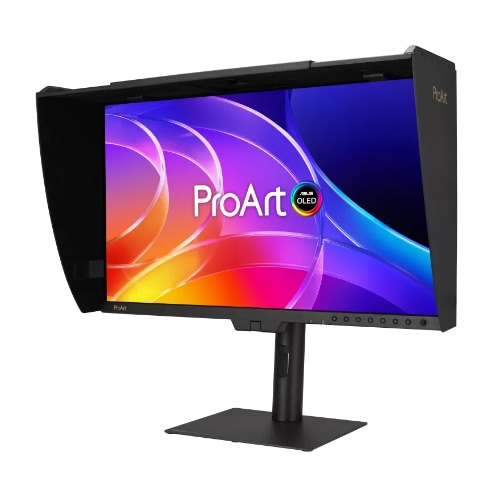
Designed for content creators, the ProArt Display OLED PA32USD is a professional monitor that features a cutting-edge 31.5-inch 4K HDR QD-OLED panel with 1000-nits brightness and 99% DCI-P3 coverage to deliver highly-accurate colors and exceptional visual detail. A built-in motorized flip colorimeter enables auto- and self-calibration for consistent, professional-grade color accuracy, and a 240Hz refresh rate allows creators to work on color-critical artwork as well as performance-driven game development — all on one monitor. In addition to the standard I/O interfaces, the PA32USD supports dual 12G-SDI connectivity to receive uncompressed video signals up to 4K@60Hz.

4K HDR31.5-inch

QD-OLEDTrueBlack

1000 nitsPeak Brightness
240 HzSmooth Rendering

99%DCI-P3

100%sRGB

ΔE < 1Color Accuracy

True 10-BitColor Depth

Self/Auto CalibrationBuilt-in motorized flip colorimeter

Hardware Calibration


Thunderbolt™ 4 with 96W Power Delivery, HDMI (v2.1), DisplayPort 2.1 and a USB hub


Multiple HDR formatsDolby Vision, HDR10, HLG


Monitor HoodHelps reduce reflections

3 YearWarranty
Metal HandleEasily portable
Two-way StandsBundled stands for versatility

Empowering Content Creators

Filmmakers & Video Editors
The PA32USD boasts high-resolution visuals with wide color gamut, true black performance, and ultrahigh contrast, making it a must-have tool when producing 4K HDR content.

Colorists
In addition to being factory-calibrated for industry-leading color fidelity with Delta E < 1 accuracy, the PA32USD includes a built-in colorimeter to help ensure long-term color accuracy and consistency. Capture cards or boxes can be directly connected to the PA32USD via SDI for high-quality, uncompressed 4K videos with precise image fidelity.

Digital Imaging Technician (DIT)
With 12G-SDI connectivity, the PA32USD is suitable for on-set production workflows. It includes a mini stand that's easy to set up, as well as a monitor hood to reduce reflections.

Game Developers
The high resolution, wide color gamut, and 240Hz refresh rate allow game developers to design and review game artwork on a single display.

3D/VFX Artists
The 240Hz refresh rate and 4K visuals provide 3D/VFX artists with supersmooth, detailed visuals. Higher refresh rates generally reduce flicker, so moving visuals appear more fluid, allowing for more comfortable viewing experiences.

Designers & Photographers
The ultra-high-quality visuals of the PA32USD ensure creative details aren't lost on the journey from click to print or production.
Amazing QD-OLED Experiences

True
Professional-Grade
ColorsThe studio-grade 99% DCI-P3 gamut ensures richer, more vivid colors, making it the ideal monitor for both color-intensive projects and other creative pursuits.

Ultra-Accurate
ColorProArt displays are factory calibrated to guarantee industry-leading color accuracy. Each monitor undergoes stringent testing to ensure smooth color gradation.

Deeper Blacks,
Brighter WhitesA peak brightness of 1000 nits (3% area) allows for outstanding contrast between the deepest black and gleaming white hues.

Advanced
Panel DesignA graphene film behind the QD-OLED panel helps reduce operating temperature. Graphene is the thinnest and strongest nanomaterial in the world and has high thermal conductivity to help effectively dissipate heat.
Ideal for Game Development and Video Editing
A 240Hz refresh rate and variable-refresh-rate (VRR) technology allow creators to work on fast-rendering visuals and conduct quality checks on the PA32USD. HDMI® 2.1, DisplayPort™ 2.1, and Thunderbolt™ 4 connectivity with 4K@240Hz support result in supersmooth visuals with exceptional levels of detail.
- 240HzRefresh Rate

Intuitive and Intelligent Calibration


Self Calibration
ProArt displays include a built-in colorimeter with an innovative self-calibration feature. This standalone solution is compatible with any operating system and doesn't require additional calibration software. Users may run the calibration process at any time, or schedule it during off hours through the OSD menu.


ProArt Hardware Calibration
ProArt Hardware Calibration software* works in both SDR and HDR modes. It saves all color parameter profiles directly on the ProArt monitor's internal scaler IC chip instead of the PC. Users can also use ProArt Calibration to schedule regular calibration intervals.
*For a list of supported color calibrators, please click Windows OS or macOS for more information.
MacCompatible
WindowsCompatible

ProArt Color Center
ProArt Color Center is an online tool designed to help administrators manage the color accuracy of multiple ProArt displays that feature hardware calibration support. Users can check when the monitors were last calibrated, next recommended calibration date, and schedule calibration times for multiple monitors―even if they're using different color parameters and/or situated in different locations.

Seamless Calibration
ProArt Display works seamlessly with third-party Calman and Light Illusion ColourSpace CMS professional hardware calibration software. It can also write back color parameters into our ProArt displays, making calibration faster and easier.

*Calman Ready support will be ready in 2026/Q2.
ASUS OLED Care
ProArt Display OLED series monitors include ASUS OLED Care features that are proven to safeguard the display by minimizing the likelihood of image burn-in.

Panel Protection
Provides Sensing Protection, Pixel Shift, Screen Saver, ISP (Global), and Off Sensing to prevent static images from being displayed continuously on your screen. This feature offers two levels of adjustment to choose from.
Image Protection
Dynamically detects and identifies the task bar, logos, and video edges, reducing the brightness around them to minimize the risk of burn-in. This feature offers three adjustable levels to choose from.
Proximity Sensor
Automatically decreases brightness gradually when it detects no user in front of the monitor. There are three adjustable detection ranges available.
*These functions can be accessed within the OSD by selecting Settings--> Screen Saver.
Uniform Brightness Setting
OLED displays feature an Auto Brightness Limiter (ABL) to maximize power use. When displaying a white (or bright) image in a particular window, the display automatically dims the image as the window size increases.
The optional Uniform Brightness function in the OSD menu is particularly useful when switching between, or changing the size of windows with vastly different contrast levels as it keeps brightness levels consistent with up to 250 nits for comfortable viewing and more accurate colors, even after hours of use.

Without Uniform Brightness setting
With Uniform Brightness setting
Create In Ultra-Vivid HDR
ASUS Smart HDR TechnologyMultiple PQ CurvesHDR Preview

ASUS Smart HDR Technology
Exclusive ASUS Smart HDR technology enables this monitor to support multiple HDR formats, including Dolby Vision®, HLG and HDR10.
Dolby Vision transforms the viewing experience with unparalleled brightness, contrast, and colors. The ProArt Display is the world's first computer monitor with Dolby Vision support, making it ideal for professional image production, color grading, and mastering.
HLG allows users to view and create material for broadcast and satellite TV platforms such as BBC iPlayer, Japan NHK TV, and DirecTV.
HDR10 support ensures compatibility with existing streaming video services and a growing list of HDR-enabled games.

12G-SDI Connectivity
SDI (Serial Digital Interface) is a professional video signal standard widely used in production. It supports long-distance transmission of uncompressed video with high reliability. SDI uses BNC cables with locking connectors on both ends, ensuring a secure connection that cannot be easily disconnected.
Compared with standard 3G-SDI, 12G-SDI offers up to four times the bandwidth, enabling the transmission and reception of uncompressed video at resolutions up to 4K@60Hz directly from camera devices, with ultra-low latency.

Flexible Connections
Dual Thunderbolt 4 ports, HDMI 2.1, and DisplayPort 2.1 ensure compatibility with current and future displays and peripherals. One of the Thunderbolt 4 ports offers up to 96W Power Delivery over a single cable to keep laptops charged, while the other supports multi-display daisy-chaining for expanded setups. The integrated USB 3.2 hub features two USB Type-A and one USB Type-C® ports to support a wide range of devices and peripherals.


12G SDI
HDMI2.1 (FRL)
DisplayPort2.1
3.5mm Audio Jack
Thunderbolt 4
USB Upstream
USB Hub
- 12G SDI
Diverse Viewing Options
Picture-by-Picture (PbP)
View content from up to four input sources simultaneously. Also, you can choose up to 2 color engines to check different color modes, including sRGB, Adobe RGB, P3, BT.2020, CAL1~3.

Picture-in-Picture (PiP)
This mode places content from a second input source in a smaller window that can be placed in any corner of the display.


Accurate Real-time On-set Preview
QuickFit Plus overlays a grid on the screen to assist with alignment and on-set previewing. It helps ensure that video content stays properly framed and does not extend beyond the visible screen area.
Central MarkerSafety AreaRulerCustomization

Exquisite Design
Versatile Stand
With two versatile stand options, the PA32USD adapts effortlessly to any setup, delivering an optimal working or viewing position whether on location or in the studio.

Cable Management
Bundled clips help manage cables and keep workspaces tidy, while the sturdy, elegant metal handle makes the monitor easy to carry wherever it's needed.


Detachable Monitor Hood
A wraparound hood minimizes reflections from surrounding light sources, ensuring confident color work in the studio or on location. An opening at the top of the hood allows convenient use of third-party colorimeters for accurate calibration without removing the monitor hood.


Ergonomic Design
Each ProArt display features an ergonomic stand with tilt, swivel, pivot, and height adjustments for comfortable viewing. The ability to pivot the screen clockwise or counterclockwise 90° for use in Portrait mode comes in handy when working with long documents, coding or web browsing. Adding to its flexibility, VESA wall mount support provides users with convenient mounting options.

Height Adjustment
0~130 mm
Tilt
-5°~+23°
Pivot
-90°~+90°
Swivel
-30°~+30°
The Perfect Monitor for Your Mac
ProArt Display combines professional-grade performance and Mac-tested compatibility. Offering vibrant colors and versatile connectivity, ProArt Display is ideal for Mac users seeking exceptional color accuracy and unmatched productivity.
Explore Why It's Perfect for Mac >
Instant Display Adjustment
Enjoy intuitive controls with ASUS DisplayWidget Center for macOS.

Seamless MacBook Controls
Use the MacBook brightness buttons to control the monitor's brightness* with ASUS DisplayWidget Center installed.
*Mouse cursor must be visible on the ProArt Display to use this function.

Sharp Details and Accurate Colors
The high pixel density ensures crisp visuals and an expansive workspace, while Delta E < 1 accuracy and wide color gamut keep colors consistently and accurate.

Supersmooth Viewing
A variable refresh rate of up to 240Hz ensures compatibility with Macs featuring Apple ProMotion technology.

Convenient Connectivity
The Thunderbolt 4 port caters to all creative needs.

Trusted Compatibility
Tested by trusted third-party labs to ensure compatibility.

"Apple", "Mac", and "MacBook" are registered trademarks of Apple Inc. ASUS and its products are not affiliated by Apple Inc. in any way.
Seamless Monitor Management
ASUS DisplayWidget Center is software that provides an intuitive interface to adjust monitor settings, including brightness, contrast, and color temperature. Whether a monitor is used for everyday viewing or for professional creative work, users can effortlessly find the optimal display settings for enhanced viewing experiences.
ProArt monitor displaying settings menu with image and color adjustments. Windows and macOS compatible download buttons are shown on the right.