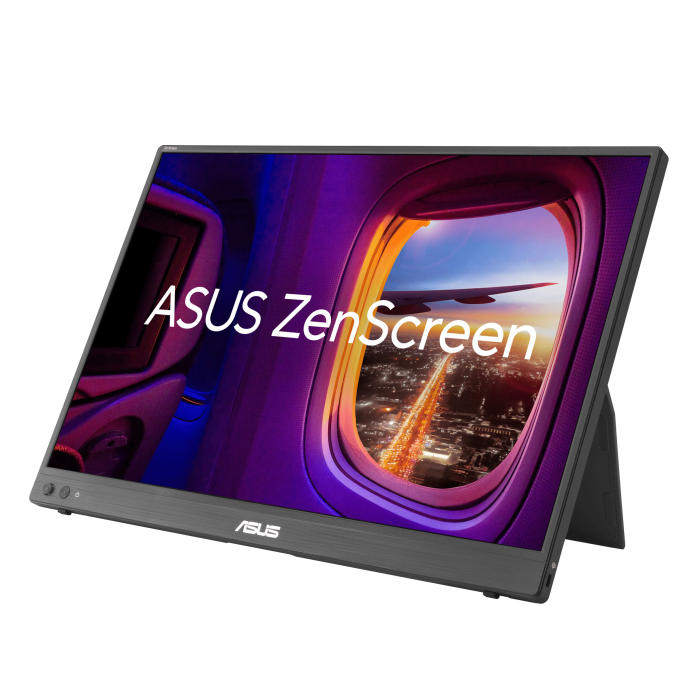
ASUS ZenScreen MB16NCG is a 16-inch portable IPS monitor featuring a WQXGA (2560 x 1600) 100% sRGB color gamut, with a 155 Hz (overclocking) SmoothMotion refresh rate. This 16:10 display provides more viewing area, making it the ideal secondary display to extend workspace for hybrid workers. With autorotation feature, giving ZenScreen the versatility to be used in either landscape or portrait orientation. Also, with power pass-through feature and USB-C ports, you can have two-way power delivery function that offers flexibility on the go.
16-inch
WQXGA
2560x1600

Vivid color reproduction

Video signal transmission and power input

Two-way power delivery

Ensure exceptional color performance


ASUS DisplayWidget Center tool enables auto rotate

Auto rotate
Automatically switch the orientation of screen

TÜV Eye Care
Flicker-free and ultra-low blue light technologies
Impressive visuals
ASUS SmoothMotion technology enables a 155 Hz refresh rate (overclocked), so everything from scrolling through webpages to gaming on ZenScreen MB16NCG feels fluid and responsive. Its DCI-P3 gamut ensure exceptional contrast and color performance.

60Hz
155Hz
More immersive
Brings you a stunning 16:10 display that’s both wider and more vibrant, boasting up to 2560x1600resolution and an impressive 84% screen-to-body ratio. Enjoy an expansive, vivid view all packed into a sleek, lightweight extended portable monitor.


Power pass through
There is the two-way power delivery function built in. The MB16NCG portable monitor can be powered by a laptop, or deliver power to a laptop via pass-through charging when plugged into a USB-C power bank or AC adapter and outlet*.

Note: 1. The connected adaptor will need to supply up to 80W to reach its maximum 65W Power Delivery
2. Suggest to use the in-box 30W adaptor to have Power Delivery support

One cable is all you need
MB16NCG features rich connectivity with dual USB-C and mini-HDMI ports. A single USB-C cable* is all you need to duplicate or extend your laptop screen. USB-C handles both power and video signal transmission, so it’s simply a matter of plug-and-play when it’s time to level up your work efficiency.
Note* Need to check whether the USB-C port of your laptop supports DP Alt mode prior to use. Or You can use HDMI connectivity along with USB-C (DC-IN) as power input instead if your laptop does not support USB-C (DP)
Showing ergo stand to enable securely prop up at any angle, from 0-90 degree

Automatic screen orientation
When connected to a Windows PC, the ASUS DisplayWidget Center tool* enables MB16NCG to sense its orientation and automatically switches the display between landscape and portrait modes.

*Software required. Auto-rotate function works only with the Windows operating system.

ASUS Eye Care
ASUS Ultra-Low Blue Light technology reduces potentially harmful blue light emissions and includes additional features that are beneficial to those who spend long hours in front of a display.
LOW BLUE LIGHT
FLICKER FREE TECHNOLOGY
ASUS Blue Light Filter
The ASUS Blue Light Filter protects viewers from harmful blue light. This feature offers a range of filter settings that are easy to access via the intuitive OSD menu.
ZenScreen MB16NCG has passed stringent performance tests and is certified by TÜV Rheinland laboratories, a global provider of technical, safety, and certification services.


With Blue Light Filter

Without Blue Light Filter

Sustaining an
Incredible Future

Environmental Certification
ASUS ZenScreen MB16NCG is stringently tested to meet the requirements of world-leading sustainability certifications. These tests include a comprehensive database of up-to-date criteria, independent verification, and a structured system for continuous improvement.


Eco-friendly packaging
The sustainable packaging of ZenScreen MB16NCG is FSC® Mix-certified. The lightweight, eco-friendly cardboard box that it’s packed in is designed to keep overall volume to a minimum, for more efficient shipping.